 Mher's Blog
This is the write-up for the PaCoin Steganography Challenge from CyHub 2023's Hac-Man CTF event. The organizers set it up to be tricky, weaving through complicated situations like analyzing the attached file and understanding the concept of candlesticks charts.
PaCoin
INFO
Below is the PaCoin challenge's solution from the CyHub 2023 CTF (Hac-Man) that occurred on November 17-18, 2023.
Description:
PUMP IT on PacNance exchangePUMP IT on PacNance exchangeHints:
- You need to ask yourself 2 questions.
- What is this data?
- What is the format of this data?
What is the task name?
Updated description is a hint
Attached File:
Solution
We started by analyzing the attached file, which contained the contents below (only shown the first few lines):
| 0 | 1 | 2 | 3 | 4 | 5 | |
|---|---|---|---|---|---|---|
| 0 | 1700297905 | 31337 | 32043.0 | 31337.0 | 32043 | 600 |
| 1 | 1700297965 | 32043 | 32683.86 | 31541.0 | 31541 | 667 |
| 2 | 1700298025 | 31541 | 31541.0 | 30197.07 | 31131 | 415 |
| 3 | 1700298085 | 31131 | 32346.26 | 30819.69 | 32026 | 491 |
| 4 | 1700298145 | 32026 | 33631.56 | 31065.22 | 32652 | 390 |
| 5 | 1700298205 | 32652 | 33577.45 | 32325.48 | 33245 | 785 |
| 6 | 1700298265 | 33245 | 33909.9 | 31913.7 | 32565 | 542 |
| 7 | 1700298325 | 32565 | 33216.3 | 30896.44 | 31852 | 303 |
We were literally staring at this document for a whole hour and here's what we understood.
By looking at this, you might as well realize that the first column is the row ID or number, and the second column (if you have ever seen one before) is a Unix Timestamp and you may also notice that it's increasing as the ID increase, which means that this is a record of something over a specific period of time, with each entry corresponding to a unique moment in that timeframe.
Now comes the tough part: understanding what the 3rd, 4th, 5th, 6th, and 7th columns are used for. As the title states, it's a coin, probably a cryptocurrency, but more is needed to understand how we can get the flag out of this.
One of our team members had a familarity with cryptocurrencies and he realized that this is a chart report for a specific time period, here's how he understood it.
Initially, we observed that the value in the 6th column corresponds to the value in the 3rd column of the subsequent line in the CSV file.
| ID | Timestamp | 3 | 4 | 5 | 6 | 7 |
|---|---|---|---|---|---|---|
| 0 | 1700297905 | 31337 | 32043.0 | 31337.0 | 32043 | 600 |
| 1 | 1700297965 | 32043 | 32683.86 | 31541.0 | 31541 | 667 |
| 2 | 1700298025 | 31541 | 31541.0 | 30197.07 | 31131 | 415 |
| 3 | 1700298085 | 31131 | 32346.26 | 30819.69 | 32026 | 491 |
For example 1st row's 6th column is 31541 which corresponds to the value in the 3rd column of the 2nd line which is also 31541.
This brought him to thinking that this is a Candlestick Chart data, because in a typical candlestick chart, the closing value of one candlestick becomes the opening value of the next candlestick. This relationship in a candlestick chart helps visually represent the continuity of price movements between consecutive time periods.
Here's what it looks like:
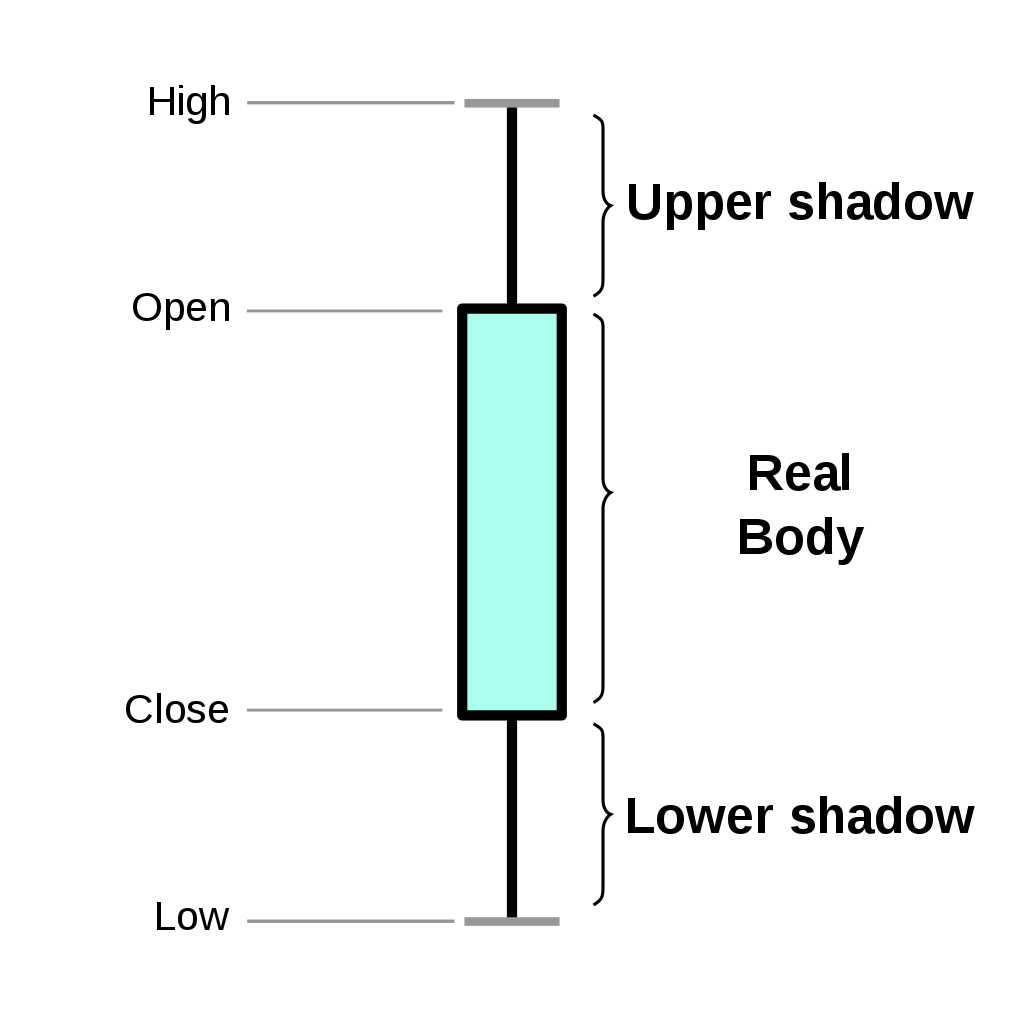
And from there, we could already name all of the remaining untitled columns.
| ID | Timestamp | Open | High | Low | Close | Volume |
|---|---|---|---|---|---|---|
| 0 | 1700297905 | 31337 | 32043.0 | 31337.0 | 32043 | 600 |
| 1 | 1700297965 | 32043 | 32683.86 | 31541.0 | 31541 | 667 |
| 2 | 1700298025 | 31541 | 31541.0 | 30197.07 | 31131 | 415 |
| 3 | 1700298085 | 31131 | 32346.26 | 30819.69 | 32026 | 491 |
| 4 | 1700298145 | 32026 | 33631.56 | 31065.22 | 32652 | 390 |
| 5 | 1700298205 | 32652 | 33577.45 | 32325.48 | 33245 | 785 |
Since we already have all the information needed we have moved forward and tried to represent its chart by using some website like OneCharts, and here's what the whole thing looked like:
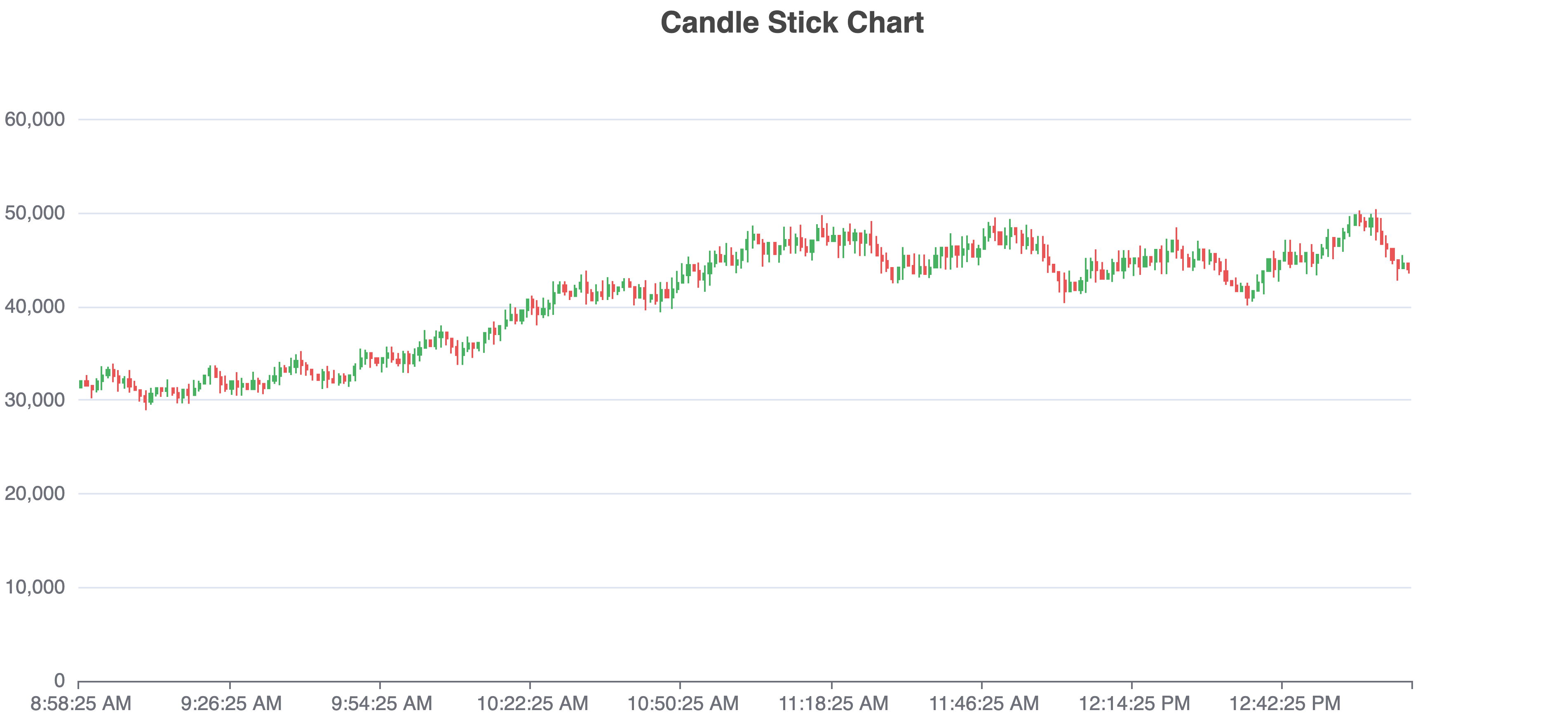
From here, we thought that we could do some tricks to get the data to be represented by 0s and 1s. The trick was to convert the red ones to 0s and the green ones to 1s. Red indicates a lower open value than close, while green indicates a higher open value than close.
To do this we first converted the CSV file into JSON (it's possible to achieve the same without converting it from CSV to JSON) using some random website.
[
  {
    "ID": 0,
    "Timestamp": 1700297905,
    "Open": 31337,
    "High": 32043,
    "Low": 31337,
    "Close": 32043,
    "Volume": 600
  },
  {
    "ID": 1,
    "Timestamp": 1700297965,
    "Open": 32043,
    "High": 32683.86,
    "Low": 31541,
    "Close": 31541,
    "Volume": 667
  },
  ...
]
[
{
"ID": 0,
"Timestamp": 1700297905,
"Open": 31337,
"High": 32043,
"Low": 31337,
"Close": 32043,
"Volume": 600
},
{
"ID": 1,
"Timestamp": 1700297965,
"Open": 32043,
"High": 32683.86,
"Low": 31541,
"Close": 31541,
"Volume": 667
},
...
]Then we wrote a small JS script that will do the hard work for us.
str = '';

for (const item of data) {
   if (item.Open <= item.Close) {
      str += '0'
   } else {
      str += '1'
   }
}
str = '';
for (const item of data) {
if (item.Open <= item.Close) {
str += '0'
} else {
str += '1'
}
}This script sets 0s for Red cells and 1s for Green cells.
Then we got our result which looked like this:
1001110010000110100101111000101010011101100001001011110011001011101100011011101110110011110011001010110010101011110011101011110010110100110010101010000011001011101011011100110010100000101110011010101010110001101000001011110110101011101111001000001010011100100001101001011110001010100111011000010010111100110010111011000110111011101100111100110010101100101010111100111010111100101101001100101010100000110010111010110111001100101000001011100110101010101100011010000010111101101010111011110010000010Then we used a pretty famous tool for cryptography called CyberChef to convert it from binary to ASCII.
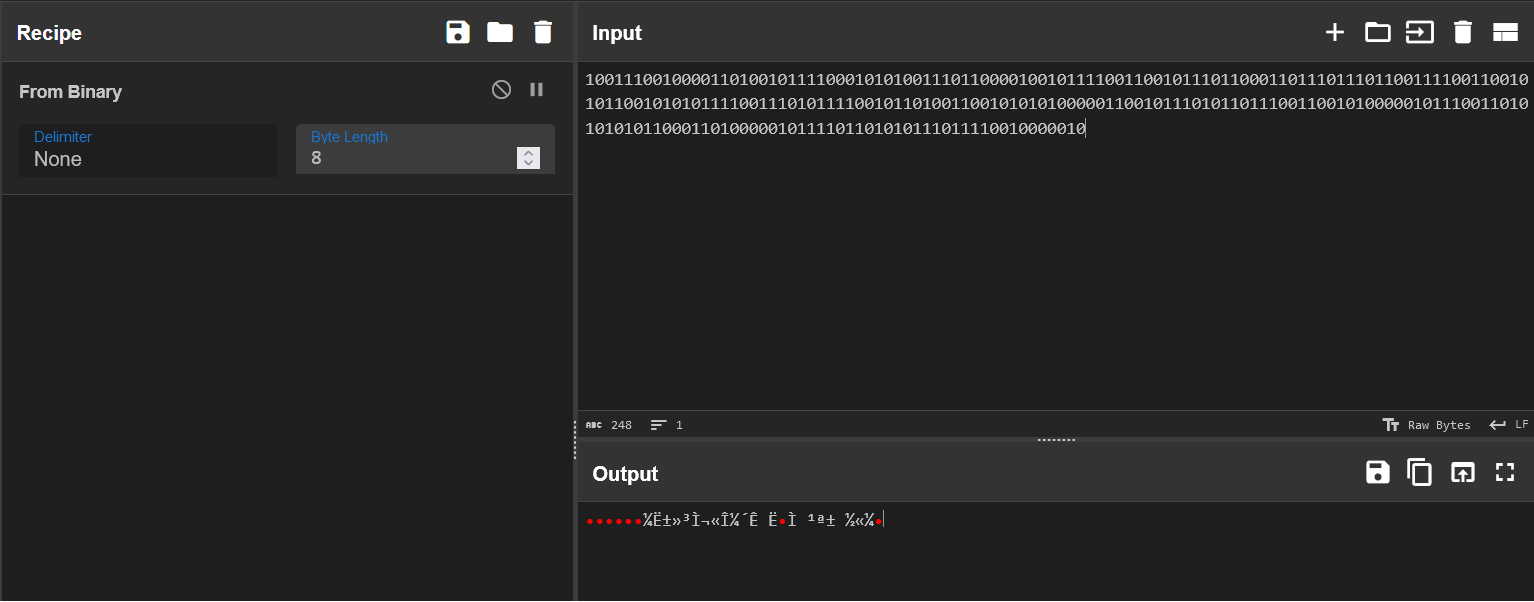
Hmm... This doesn't look like a flag, is it?
We didn't gave up and tried to instead set 1s for Red cells and 0s for Green cells, and this time we used this updated script.
str = '';

for (const item of data) {
   if (item.Open <= item.Close) {
      str += '1'
   } else {
      str += '0'
   }
}
str = '';
for (const item of data) {
if (item.Open <= item.Close) {
str += '1'
} else {
str += '0'
}
}This script sets 1s for Red cells and 0s for Green cells.
Then we got our new result which looked like this:
0110001101111001011010000111010101100010011110110100001100110100010011100100010001001100001100110101001101010100001100010100001101001011001101010101111100110100010100100011001101011111010001100101010101001110010111110100001001010100010000110111110101100011011110010110100001110101011000100111101101000011001101000100111001000100010011000011001101010011010101000011000101000011010010110011010101011111001101000101001000110011010111110100011001010101010011100101111101000010010101000100001101111101And now, when we tried to convert it from binary to ASCII we finally got the flag 🎉🎉 and were able to submit it 5 minutes before the end of the CTF challange.
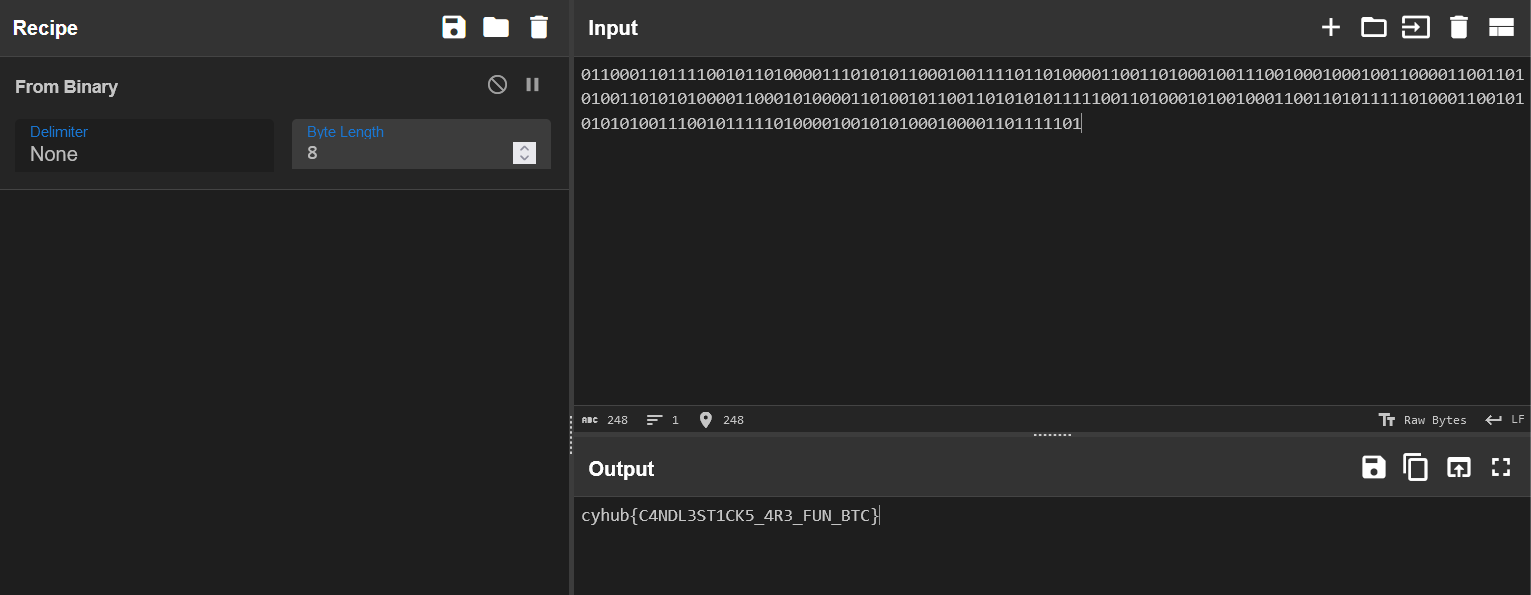
cyhub{C4NDL3ST1CK5_4R3_FUN_BTC}cyhub{C4NDL3ST1CK5_4R3_FUN_BTC}Conclusion
This was a very interesting steganography challenge, we had submitted the flag 5 minutes before the end of the CTF challange and jumped from 10th place to 7th just because of this task.